THUNDER-PERFORMANCE(7)
Reference indexNAME
thunder-performance — time to confirm a write in Thunder and Redis
RESULTS
On 15 November 2026, we measured how long a client waited for Thunder and Redis to confirm a write. We used eight TLS connections. Each sent one value, waited for the server to flush it to disk and reply, then sent the next value.
Each entry is a 99th percentile (p99). For example, with 64 MiB values, 99% of Thunder writes finished within 655 milliseconds.
| Value | Thunderstrike | Redis 7.0.15 |
|---|---|---|
| 256 B | 7.04 | 1.07 |
| 4 KiB | 8.70 | 1.91 |
| 2 MiB | 38.9 | 121 |
| 16 MiB | 193 | 778 |
| 64 MiB | 655 | 2,929 |
| 256 MiB | 2,490 | 13,633 |
| 512 MiB | 3,080 | 27,333 |
Redis had the lower p99 at 256 B and 4 KiB. Thunder had the lower p99 at the five larger sizes tested. At 256 and 512 MiB, the small Redis samples limit what the comparison can tell us.
TEST CONDITIONS
- Machine
- One VM had four 2.1 GHz Xeon vCPUs, 15 GB of RAM, and one virtio disk. The server used two vCPUs. The client that generated the writes used the other two.
- Server settings
- Thunder used its write-ahead log and 1,024 logical shards. Redis appended each write to disk with
appendonly yesandappendfsync always. We disabled Redis snapshots. Both servers used TLS 1.3. - Run length
- We ran each configuration once. Thunder runs lasted 30–60 seconds. Redis runs stopped after 15 seconds or 10 GiB written, whichever came first.
LIMITS
At 256 and 512 MiB, Redis completed only 12–17 writes per run. With so few observations, its reported p99 equals the single slowest write.
The original chart also shows 32-connection tests. In Thunder’s multiplexed mode, multiple requests share a TLS connection. The chart compares those results with the same 32-connection Redis run used in the ordinary comparison.
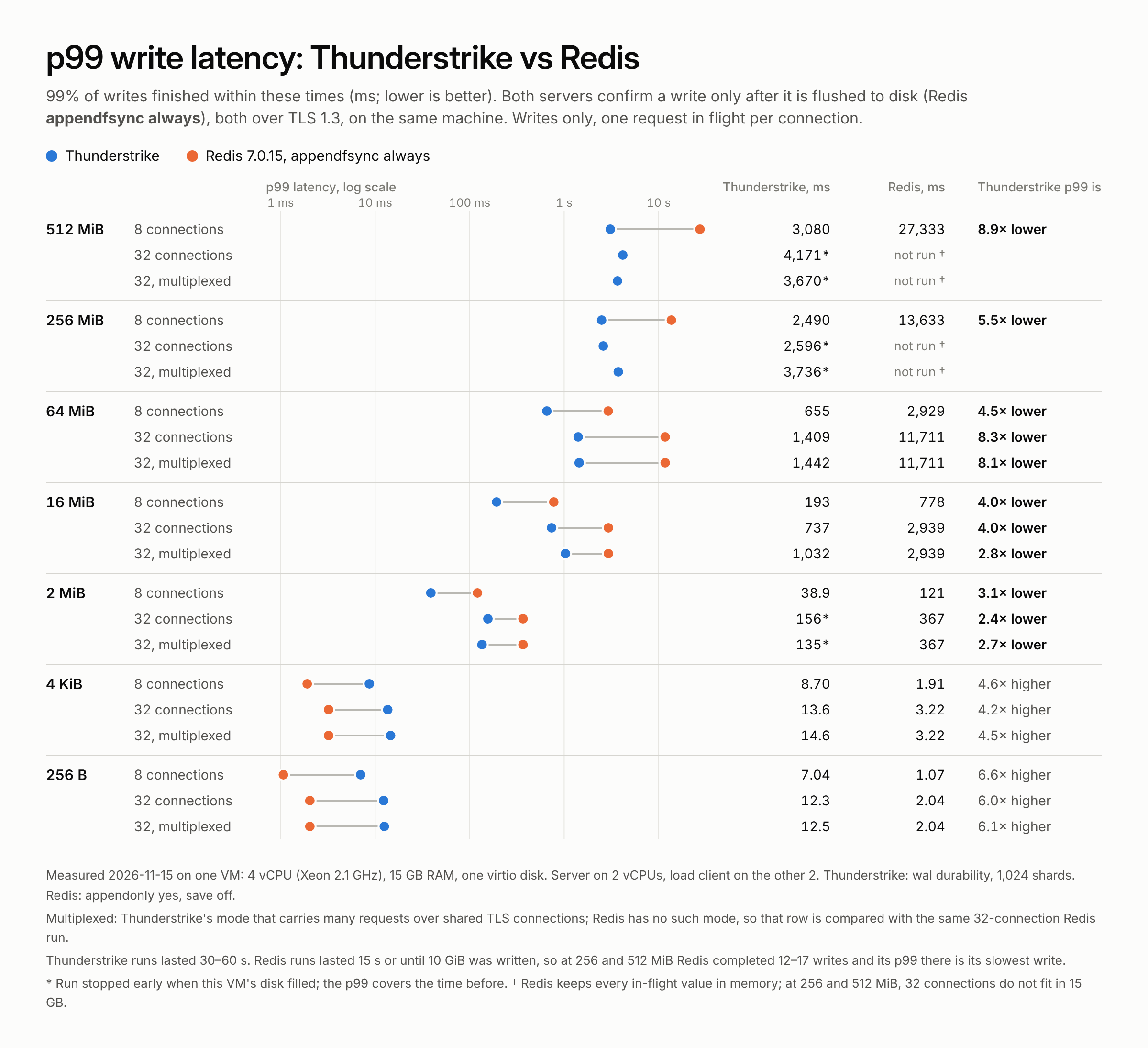
An asterisk marks a run that filled the disk. Its p99 covers only the writes before that point. At 256 and 512 MiB, 32 concurrent Redis writes exceeded the VM’s memory budget, so the chart has no Redis result for those cases.
LOCAL EVALUATION
Run the sample from the release-kit directory against a running server. For 30 seconds, eight connections write values in five sizes from 256 B to 16 MiB. The sample reads each value back and compares the bytes. Exit status 0 means every operation succeeded and every value matched.
docker compose run --rm sampleFor an AI application, time the writes your workers actually make. A short JSON checkpoint and a 64 MiB model output have different costs. Report each size separately, along with the number of simultaneous writes, successful bytes per second, errors, and the 50th, 95th, and 99th percentile latencies. Use the same disk, memory budget, and durability settings when you repeat a run.